Why eSignature Software Matters in 2026 (and How the Top Platforms Compare)
The Rise of Digital Signing in Modern Workflows
Paper-based signing is no longer a practical option for most businesses. Contracts that once required printing, scanning, and overnight shipping now close in minutes. Remote work, distributed teams, and global vendor relationships have made electronic signatures a baseline operational requirement — not a nice-to-have upgrade.
The shift shows up everywhere. HR teams send offer letters to candidates in different time zones. Freelancers and small businesses close deals with clients they've never met in person. Contractors get change orders approved from job sites. Legal teams route NDAs through multi-party approval chains without a single sheet of paper. The common thread is speed — businesses that can execute agreements faster move faster.
What's changed in 2026 is the baseline expectation. Signing a document electronically is table stakes now. The real differentiator is which platform lets you do it without paying per envelope, per user, or per feature unlock — and which one actually fits the workflow a small team or solo freelancer runs day to day, rather than the one built for a 500-person procurement department.
Key Risks of Choosing the Wrong eSignature Tool
Picking the wrong platform costs more than money — it costs time, trust, and momentum. The failure modes are predictable: a platform that looks affordable at signup but charges per envelope once volume grows, a tool that requires a separate paid seat for every person who needs to send documents, or a solution that buries audit trails behind a premium tier you didn't budget for.
There are workflow risks too. If your signing tool doesn't support sequential routing — one party signs before the next receives the document — you end up managing that order manually. If it doesn't send automated reminders, someone on your team becomes the reminder. If it doesn't give you real-time status tracking, you're emailing signers to ask whether they've even opened the thing.
Legal risk is a separate concern. Not every electronic signature carries identical legal weight in every jurisdiction. Understanding whether a platform's signing process is built around the standards your industry and geography require matters before you commit — not after a dispute.
What to Look for Before You Compare
Start with the integration layer. Does the platform need to connect to your CRM, HR system, or an internal product via API? If you're a developer or small SaaS team, API access and webhook events may be non-negotiable. If you're a freelancer or small business owner sending client contracts, a clean web interface with reusable templates may be everything you actually need.
Then look at the pricing model honestly. Per-envelope pricing sounds reasonable until your volume grows. Per-user pricing sounds fair until your team expands past two or three people. Flat or generously-capped pricing — where a low monthly fee covers real usage without constant overage anxiety — is the model that scales without surprises.
How We Compared These Platforms
Pricing here reflects official vendor pricing pages and current published rates as of mid-2026, not just headline numbers. We looked at what each plan actually includes, what triggers an upgrade, and where the caps and hidden costs show up — because a low monthly rate that charges per envelope or per seat can end up costing more than a straightforward flat-rate plan once real usage kicks in.
Platforms weren't given a single numerical score, because a score that means something for a 500-person enterprise means nothing for a two-person freelance operation. Instead, each platform is evaluated on fit for specific use cases — the goal is helping you find the tool that matches your actual situation, not crowning one universal winner. That said, one thing is worth flagging up front: Base0's free Basic plan — 50 documents a month, no user cap on templates, no credit card required — is a meaningfully different starting point than the 3-to-5-document free tiers most competitors offer.
Base0: Built for Freelancers and Small Businesses, Not Enterprise Procurement
Core Features and Capabilities
Base0 is built around a simple premise: a freelancer or small business shouldn't need an enterprise sales call to send a contract and get paid. That premise shapes the whole product.
Basic — $0/month
- 50 documents per month
- 3 system templates
- Standard email support
- No credit card required to start
Pro — $9/month Everything in Basic, plus:
- Unlimited document generation
- Real-time Slack & Discord webhooks
- Flexible workflow envelope re-routing
- Priority handling support
Enterprise — $29.99/month Everything in Pro, plus:
- Full-suite corporate white labeling
- Deep Salesforce CRM automation sync
- Dedicated 24/7 account management
- Personalized developer API sandbox key
Pros and Cons
Pros:
- A genuinely usable free plan — 50 documents/month is enough for most solo freelancers and very small businesses to run on indefinitely, not just trial the product
- No credit card required to start
- Unlimited document generation at $9/month, with no per-seat pricing structure to plan around as you grow
- Webhooks (Slack, Discord) included at the Pro tier — useful for teams that already live in chat tools rather than a heavyweight CRM
- Contract-to-payment workflow built in, rather than requiring a separate invoicing tool
- Enterprise tier includes white labeling and Salesforce sync for teams that need to look and integrate like a bigger operation without switching platforms
Cons:
- Basic is capped at 50 documents/month and 3 templates — active users doing template-heavy work will outgrow it quickly
- Full API access (developer sandbox key) is reserved for the Enterprise tier at $29.99/month, so lightweight custom integrations aren't available on Pro
- Base0 is focused on contract generation, signing, and payment tracking rather than being a general-purpose document editor
Who Should Use Base0
Base0 is the right fit for:
- Freelancers and consultants sending client contracts, retainer agreements, and scope approvals
- Small agencies and service businesses that want signing and invoicing in the same place instead of stitching two tools together
- Small teams that coordinate over Slack or Discord and want signing status pushed directly into a channel they already watch
- Growing businesses that eventually want Salesforce sync and white-labeled signing without moving to an enterprise-tier competitor
If you're currently paying per envelope or per seat on a platform built for much larger teams, Base0's free Basic plan is worth testing before your next renewal.
Top Competitors: How They Compare on Price and Fit
DocuSign: Enterprise-Grade Power, Enterprise-Grade Pricing
DocuSign is the most recognized name in e-signature software, and that brand recognition is a real asset in enterprise sales cycles — counterparties are familiar with the signing flow, and IT teams have often already approved it.
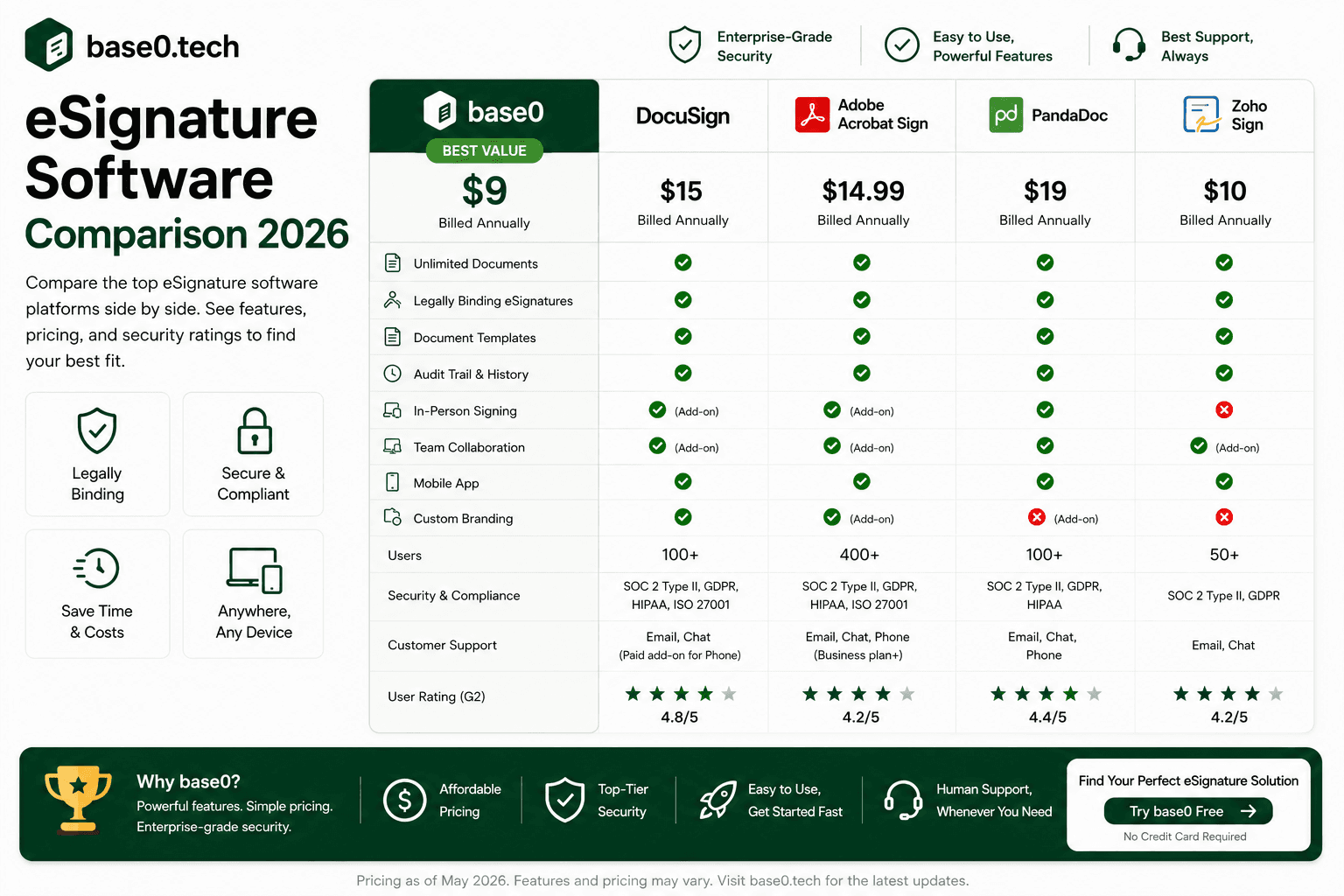
Current published pricing runs the Personal plan at roughly $11/month, capped at five envelopes per month, with the Standard plan around $30 per user per month (about 100 envelopes per user per year) and Business Pro around $45 per user per month at the same envelope allowance — enterprise-level "Enhanced" plans require a custom quote from sales.<cite index="23-1">Docusign's Personal plan runs about $11 per month with five envelopes included, Standard runs about $30 per user per month with up to 100 envelopes per user per year, and Business Pro runs about $45 per user per month at the same envelope allowance, with Enhanced plans priced through a custom sales quote.</cite>
For a team of five on Standard, that's real money fast, and it's before any add-ons like SMS delivery or ID verification, which are billed separately per use.<cite index="23-1">Add-ons such as SMS delivery and ID verification are priced per use on top of the base subscription.</cite> DocuSign makes sense for large organizations with complex compliance requirements and existing IT procurement processes. For a freelancer or small team, the per-envelope caps and per-seat costs compound quickly compared to Base0's flat, unlimited Pro tier at $9/month.
Adobe Acrobat Sign: Best for Teams Already Living in Adobe
Adobe Acrobat Sign integrates tightly with Acrobat and the broader Adobe Document Cloud. If your team already works in Acrobat for PDF editing, the signing workflow feels native, and the compliance feature set is comprehensive.
Pricing is bundled into Acrobat's individual and team plans rather than sold as a standalone signing product, which makes it genuinely harder to compare apples-to-apples — published rates for individual plans generally sit in the roughly $13–$20/month range, with team ("for teams") plans running higher per seat, and enterprise pricing requiring a custom quote.<cite index="26-1,24-1">Adobe Acrobat Sign is not sold as a standalone product for individuals — e-signature features are bundled into Acrobat plans, with individual pricing generally starting around $13–20 per month and team plans priced per seat, while enterprise-level Acrobat Sign Solutions use custom pricing through Adobe sales.</cite>
Adobe makes sense if your organization is already invested in the Adobe ecosystem and the per-seat premium fits your budget. For teams outside that ecosystem, the pricing is harder to justify against alternatives offering comparable signing functionality for less — Base0's Pro tier costs less than a single Adobe seat and covers unlimited sending for the whole account.
Dropbox Sign: Best for Existing Dropbox Users
Dropbox Sign (formerly HelloSign) is approachable and integrates naturally with Dropbox storage, with a smooth signing experience for recipients.
The free tier allows only three signature requests per month — enough to test the product, not to run a business on.<cite index="34-1">Dropbox Sign's free plan allows sending three signature requests per month, with unlimited self-signing that doesn't count against that cap.</cite> Paid tiers start with Essentials at roughly $15/month for a single user with unlimited requests, stepping up to Standard at roughly $25 per user per month for small teams, with a custom-quoted Premium tier above that.<cite index="34-1">The Essentials plan starts around $15 per month for one user with unlimited signature requests, Standard runs around $25 per user per month for small teams, and Premium is custom-priced for larger teams with advanced admin, reporting, and security needs.</cite>
Dropbox Sign is reasonable for individuals or very small teams already living in Dropbox who want a simple, integrated signing tool. For anyone who wants more than three free sends a month without immediately paying $15+, Base0's 50-document free tier is a wider runway to actually test the workflow before committing.
PandaDoc: Best for Sales Teams Building Proposals and Signing in One Flow
PandaDoc isn't a pure e-signature tool — it's a document workflow platform combining proposal creation, quoting, and signing in one product. If your sales team builds proposals from scratch with pricing tables and wants signing baked into that same flow, PandaDoc is purpose-built for it.
The free plan caps out at five documents a month (60 a year), with the Starter tier running roughly $19 per user per month on an annual commitment and the Business tier around $49 per user per month, plus a custom-quoted Enterprise tier above that.<cite index="41-1">PandaDoc's free plan is capped at five documents per month (60 per year), the Starter plan begins around $19 per user per month on annual billing, and the Business plan starts around $49 per user per month, with Enterprise pricing available through a custom quote.</cite>
PandaDoc's complexity and per-user pricing make it a poor fit for anyone who just needs to send existing PDFs for signature rather than build proposals from scratch. If proposal-building and signing genuinely need to live in one workflow, it's worth evaluating — otherwise, Base0 covers the contract-and-signature half of that workflow at a fraction of the monthly cost, and connects directly to payment tracking once the deal is signed.
SignNow: Best Budget-Friendly Enterprise Alternative
SignNow positions itself as an affordable DocuSign alternative, covering most standard signing workflows including templates and multi-party signing.
Published pricing runs the Business plan at roughly $8 per user per month (annual billing), Business Premium at roughly $15 per user per month, and Enterprise at roughly $30 per user per month — each tier still capped at around 100 signature invites per user per year, with overage charged per additional invite.<cite index="48-1">SignNow's Business plan runs about $8 per user per month annually, Business Premium about $15 per user per month, and Enterprise about $30 per user per month, with each subscription tier including 100 signature invites per user per year.</cite>
SignNow is a reasonable option for small-to-mid-sized, price-sensitive businesses that need a paid tool and can live within the invite cap. For freelancers or small teams that would rather not track an annual invite allowance at all, Base0's Pro plan removes that ceiling entirely for less than SignNow's entry-level per-seat rate.
Feature Deep Dive: What Actually Separates These Platforms
Signing Workflows and Automation
Uploading a PDF, adding a signature field, and sending it is table stakes everywhere. What separates platforms is what happens around that: how documents route through multiple signers, how the system handles non-responsive signers, and how much of that runs without manual intervention.
Automated reminders matter most in practice — a signing request that sits unopened for three days costs deals and delays onboarding. A tool that nudges non-responders automatically means nobody on your team has to remember to do it manually. Expiration controls round this out, ensuring outdated documents can't be signed after terms have changed.
Audit Trails and Document Tracking
An audit trail is the evidentiary record of a document's lifecycle — who sent it, who viewed it, when each party signed, and what timestamp and context accompanied each action. This record matters in disputes, compliance reviews, and internal audits, and it's the core reason electronic signatures hold up as well as they do legally: intent and attribution have to be demonstrable, and a timestamped audit trail is what demonstrates them.
Some platforms restrict detailed audit logs to higher paid tiers. If audit trail access matters for your use case — and for most contract or NDA use cases, it should — verify exactly what's included at each pricing tier before committing to a platform.
Template Management and Reusability
Reusable templates eliminate the repetitive work of setting up the same fields every time you send a standard agreement — build the template once, reuse it for every future send. For freelancers who send the same retainer agreement or scope-of-work document repeatedly, this is one of the highest-leverage features in the entire category, far more impactful day-to-day than most of the enterprise integration ecosystem.
ESIGN Act, UETA, and eIDAS
Electronic signatures derive their legal validity from specific legislation. In the U.S., the ESIGN Act and UETA establish that electronic signatures are legally equivalent to handwritten ones for most commercial transactions. In the EU, eIDAS governs electronic signature standards across a tiered system — Simple, Advanced, and Qualified Electronic Signatures, with Qualified carrying the most legal weight and requiring identity verification through a qualified trust service provider.
Most standard e-signature platforms — Base0 included — operate at the level appropriate for typical commercial agreements: contracts, NDAs, retainer agreements, vendor agreements. Qualified Electronic Signatures are reserved for specific high-stakes transaction types in certain EU jurisdictions, like real estate transfers and notarial acts. As with any legal matter, consult qualified counsel for guidance specific to your industry, jurisdiction, or transaction type — no e-signature platform can guarantee validity in every possible context.
Per-User vs. Flat-Rate Pricing
Per-user pricing is the dominant model among established vendors. It's predictable for the vendor and unpredictable for the buyer — every team member you add who needs to send documents increases your bill. For a growing freelance business or small agency, that compounds fast.
To illustrate the gap: DocuSign Standard at roughly $30/user/month runs about $3,600/year for a team of ten.<cite index="23-1">Docusign's Standard plan is priced at $30 per user per month on an annual commitment.</cite> PandaDoc Business at roughly $49/user/month runs close to $5,900/year for the same team.<cite index="41-1">PandaDoc's Business plan starts around $49 per user per month.</cite> Base0's Enterprise tier, by contrast, is a single flat $29.99/month regardless of team size — a two-person team and a twenty-person team pay the same rate.
Best Value Picks by Business Size
- Solo freelancers and independent contractors: Base0 Basic — 50 documents/month, no credit card, genuinely usable long-term rather than a time-boxed trial
- Small teams (2–10 people): Base0 Pro ($9/month) for unlimited document generation and webhook notifications without per-seat math
- Growing teams that need white-labeling or Salesforce sync: Base0 Enterprise ($29.99/month) — still a flat rate well below a single enterprise seat on DocuSign or PandaDoc
- Large enterprises with complex compliance and procurement requirements: DocuSign or Adobe Acrobat Sign, given their established enterprise compliance programs and integration ecosystems
- Teams already committed to a specific ecosystem (Adobe, Dropbox): Adobe Acrobat Sign or Dropbox Sign, respectively, for the native integration — though at a real pricing premium over standalone tools
Which eSignature Software Is Right for Your Use Case
Best for Freelancers and Small Businesses
Freelancers and small businesses need a tool that works immediately, costs nothing to start, and doesn't create billing surprises as the business grows. Base0's Basic plan is the clearest fit: 50 documents a month, no credit card, and — unlike most competitor free tiers capped at 3–5 documents — enough headroom to actually run a small signing workload on the free plan rather than treating it as a trial.
Best for Sales-Heavy Small Teams
If contracts and payment tracking need to live together — sending a contract, watching it get signed, and knowing whether the resulting invoice has been paid — Base0's built-in payment tracking (covered in our guide on closing deals faster) does something none of the pure signing tools above attempt.
Best for Teams That Live in Slack or Discord
Base0's Pro plan pushes real-time signing status directly into Slack or Discord via webhooks, which matters more than it sounds for small teams that don't run a formal CRM — you find out a contract's been signed the moment it happens, in the tool you're already watching.
Best for Enterprise and Regulated Industries
Enterprise and legal teams typically need more than core signing: complex multi-party routing, deep audit requirements, and integration with existing enterprise systems. DocuSign and Adobe Acrobat Sign have the deepest enterprise compliance programs and broadest integration ecosystems of the platforms covered here, and are worth evaluating directly for organizations with established procurement processes and the budget for per-user licensing.
How to Switch to a New eSignature Platform Without Disruption
Migrating Templates and Existing Documents
Switching platforms is less disruptive than most people expect, because the core asset — your PDF documents — is platform-agnostic. You're not locked into a proprietary format; your contracts and agreements exist as PDFs you can upload anywhere.
What does take some effort is your template library. If you've built reusable templates on a previous platform, you'll need to recreate them — upload the PDF, add fields, define recipients and signing order, save as a template. For most standard documents, this takes minutes per template, not hours.
Download and archive completed, signed documents from your previous platform before cancelling that subscription. Base0 generates finalized documents with applied signatures that you can download and store wherever you keep your records.
Getting Your Team Up to Speed
The most common friction point in a platform switch isn't technical — it's behavioral. People who've built habits around a previous tool need a reason to change and a clear, fast path to competence on the new one.
A core send-a-document workflow that follows a logical sequence — upload, add fields, set recipients, send — is usually learnable on the first attempt without formal training. For teams with more complex workflows, a reusable template reduces the setup learning curve considerably. The most effective rollout: identify one or two people who learn the new platform first, then have them support colleagues through their first few sends.
FAQ
What's the best e-signature software for freelancers and small businesses in 2026? For most solo freelancers and small teams, the deciding factor is a genuinely usable free tier plus pricing that doesn't punish growth. Base0's Basic plan offers 50 documents a month at $0 with no credit card required — a wider runway than the 3–5 document free tiers most competitors offer — and the $9/month Pro tier removes the document cap entirely without moving to per-seat pricing.
Is Base0 legally binding in the United States and European Union? Electronic signatures are recognized as legally equivalent to handwritten ones in the U.S. under the ESIGN Act and UETA, and in the EU under eIDAS, for the vast majority of standard commercial transactions — provided the signer intended to sign and the signature can be attributed to them. A complete, timestamped audit trail is what supports that attribution if a dispute arises. As with any e-signature platform, specific high-stakes or regulated transaction types may have additional requirements — consult legal counsel for guidance specific to your situation.
Why does e-signature pricing vary so much between platforms? The two biggest cost drivers are envelope/document caps and per-user fees. Platforms like DocuSign and SignNow price per user with annual envelope allowances that trigger overage costs once exceeded.<cite index="23-1,48-1">DocuSign's Standard and Business Pro plans cap usage at roughly 100 envelopes per user per year, and SignNow's paid tiers cap around 100 signature invites per user per year.</cite> Flat or high-cap pricing — like Base0's unlimited Pro tier at a single flat monthly rate — avoids that compounding cost as a team or document volume grows.
How much does it cost to send 50 contracts a month as a small business? On most competitor platforms, 50 documents a month would push you well past the free tier and often past the entry-level paid tier too — DocuSign's Personal plan caps at 5/month, Dropbox Sign's free plan at 3/month, and PandaDoc's free plan at roughly 5/month.<cite index="34-1,41-1">Dropbox Sign's free plan is capped at three signature requests per month, and PandaDoc's free plan is capped at roughly five documents per month.</cite> Base0's free Basic plan covers exactly that volume — 50 documents a month — at no cost.
Can I switch e-signature platforms without losing my existing contracts? Yes. Signed documents are standard PDFs, not a proprietary format, so your historical contracts remain accessible regardless of which platform you used to sign them — just download and archive them before cancelling a previous subscription. Only your reusable template setup needs to be rebuilt on the new platform, which typically takes minutes per template.