Cheapest Electronic Signature Software in 2026: A Real Pricing Breakdown
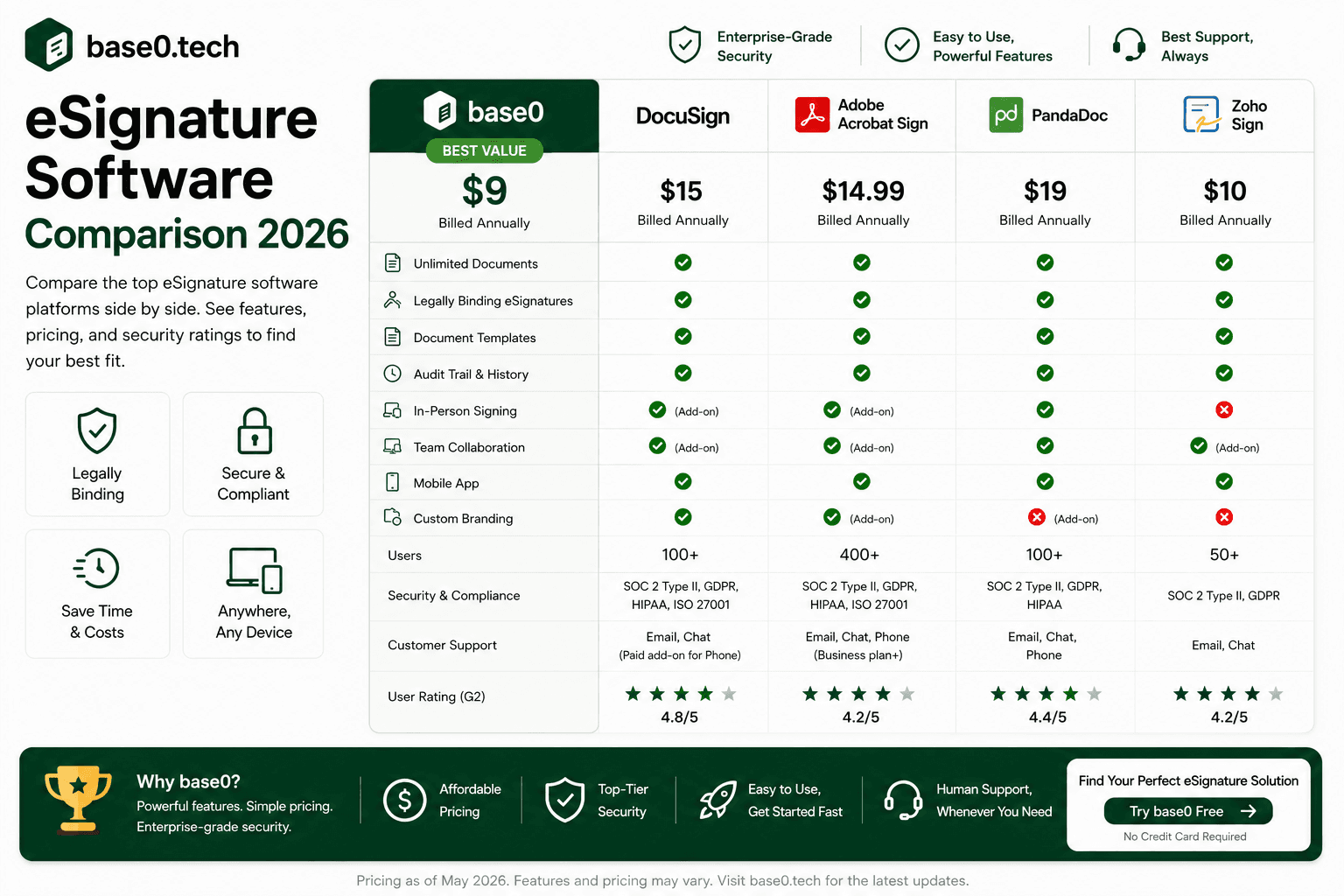
If you're searching for the cheapest electronic signature software in 2026, you already know the problem: most platforms charge per envelope, per user, or both — and the costs compound fast. Whether you're a freelancer sending client contracts, a small business processing offer letters, or a developer who eventually wants to embed signing into a product, overpaying for e-signatures is a real and avoidable expense. This guide breaks down what affordable e-signature software should actually include, how Base0's pricing compares to the major players, and where the real savings show up once you look past the sticker price.
Why Finding the Cheapest E-Signature Software Actually Matters
The Hidden Costs of Overpriced Platforms
The sticker price on most e-signature platforms is rarely the full story. DocuSign's Standard plan lists at roughly $30 per user per month, but that figure doesn't include the envelope caps or the cost of adding a second user.<cite index="23-1">Docusign's Standard plan runs about $30 per user per month on an annual commitment, with up to 100 envelopes per user per year included.</cite> Adobe Acrobat Sign starts in the neighborhood of $13–20/month for individuals, with team pricing running higher per seat and its own document allowances.<cite index="26-1,24-1">Adobe Acrobat Sign's e-signature features are bundled into Acrobat plans rather than sold standalone, with individual pricing generally starting around $13–20 per month and team plans priced per seat.</cite> These platforms were built in an era when per-envelope billing was the norm, and they've kept that model because it's profitable for them — not because it's fair to the buyer.
Hidden costs show up in predictable places: overage charges once you exceed a monthly envelope limit, per-seat fees the moment your team grows by one person, and upgrade walls that lock basic features like audit trails or bulk send behind premium tiers. Add those up across a year, and a plan that looked affordable at signup can end up costing two or three times what you budgeted.
How Freelancers and Small Businesses End Up Overspending
Small businesses and freelancers are the most exposed to these pricing traps, because low document volume looks "cheap" on a per-envelope platform right up until the month it isn't. A freelancer on Dropbox Sign's Essentials plan pays roughly $15/month for a single user with unlimited requests — reasonable if you're sending constantly, expensive if some months you send five contracts and others you send none.<cite index="34-1">Dropbox Sign's Essentials plan starts around $15 per month for one user with unlimited signature requests, while the free tier is capped at three signature requests per month.</cite>
For anyone whose sending is bursty — end-of-quarter contract pushes, seasonal onboarding waves, project kickoffs — per-envelope or heavily-capped pricing is especially punishing. You hit the ceiling exactly when your business is busiest.
What "Cheap" Actually Means
Cheap e-signature software isn't just the lowest number on the pricing page — it's what you get per dollar, and what you don't lose by choosing the budget option. A free plan that caps you at three documents a month isn't cheap; it's a trial with a countdown. A plan that charges extra for templates, bulk send, or audit trails isn't affordable; it's a base price with a long list of add-ons waiting behind it.
Real value looks like: generous (not token) document sending, audit trails included by default, templates included, and a pricing model that doesn't punish you for growing. That's the bar Base0 was built around.
What to Look for Before Choosing a Budget E-Signature Tool
Legal Validity Comes Before Price
Before price, legality — an electronic signature is only useful if it actually holds up. In the U.S., the ESIGN Act and UETA establish that electronic signatures carry the same legal weight as handwritten ones when both parties consent to signing electronically. In the EU, eIDAS governs e-signature validity across member states.
When evaluating any platform on price, confirm it still covers the standard elements required for legal validity: clear signer identity, documented consent, tamper-evident records, and a complete audit trail. A cheap plan that skips the audit trail isn't actually cheap — it's a signature you can't defend if anyone ever questions it.
Core Features a Budget Plan Should Still Include
Not every feature belongs on a free tier, but some are non-negotiable even at the entry level. Before committing to any platform, verify the plan you're considering includes:
- Generous document sending, not capped at 3–5 documents a month
- Reusable templates, so you're not rebuilding the same document every time
- Automated reminders for recipients who haven't signed
- Expiration controls so requests don't sit open indefinitely
- Audit trails with timestamps for every completed document
- Real-time status tracking (sent, viewed, signed, declined)
Base0's free Basic plan covers most of this list already — 50 documents a month, reusable templates, and standard support — with no credit card required to start.
Red Flags in "Cheap" Plans
Low-cost plans from established platforms frequently strip out the features that make e-signatures actually useful. Watch for:
- Envelope caps so low the free tier functions as a trial, not a real plan (three to five documents a month is common)
- No permanent free plan — only a time-boxed trial that starts counting down the moment you sign up
- Templates or audit trails locked behind a paid tier
- Per-user pricing that scales your bill with every new team member
- Bulk send treated as a premium add-on rather than a standard feature
If a platform's "free" plan is really just a trial, or its affordable paid plan strips out templates and audit trails, that's not cheap software — it's a limited demo with a price tag waiting on the other side.
Base0 Pricing: What You Actually Get at Each Tier
Basic — $0/Month
No credit card required. Includes:
- 50 documents per month
- 3 system templates
- Standard email support
Unlike most competitor free tiers capped at three to five documents, 50 documents a month is enough for most freelancers and small businesses to run real, ongoing signing volume — not just kick the tires for a week.
Pro — $9/Month
Everything in Basic, plus:
- Unlimited document generation
- Real-time Slack & Discord webhooks
- Flexible workflow envelope re-routing
- Priority handling support
This is the tier most growing freelancers and small teams land on: the document cap disappears entirely, and signing status gets pushed straight into a Slack or Discord channel you're already watching, instead of requiring you to log in and check.
Enterprise — $29.99/Month
Everything in Pro, plus:
- Full-suite corporate white labeling
- Deep Salesforce CRM automation sync
- Dedicated 24/7 account management
- Personalized developer API sandbox key
This tier is aimed at businesses that want a branded, white-labeled signing experience and Salesforce-connected workflows without adopting an enterprise-grade platform priced for a much larger organization.
Across all three tiers, the pricing is a flat monthly fee per plan — not a per-document surcharge once you exceed a cap on the paid tiers, and not a metered cost that fluctuates with how busy a given month happens to be.
Base0 vs. DocuSign: What the Same Volume Actually Costs
DocuSign remains the most recognized name in e-signatures, and that recognition carries real weight in enterprise sales cycles. But recognition comes at a price: the Personal plan runs about $11/month for just five envelopes, the Standard plan runs about $30 per user per month for up to 100 envelopes per user per year, and Business Pro runs about $45 per user per month at the same allowance.<cite index="23-1">Docusign's Personal plan is priced at about $11 per month with five envelopes included, Standard at about $30 per user per month with up to 100 envelopes per user per year, and Business Pro at about $45 per user per month at the same allowance.</cite>
For a freelancer sending even a modest volume of contracts, DocuSign Personal's five-envelope cap is exhausted in the first week of most months — which forces an upgrade to Standard, where the per-user pricing means every additional person who needs to send documents adds directly to the bill.
Base0's Basic plan covers 50 documents a month at $0, ten times DocuSign's Personal envelope allowance, and Base0 Pro removes the document cap entirely for $9/month — well under a single month of DocuSign Standard for one user, let alone a growing team.
Base0 vs. Adobe Acrobat Sign: Signing Without the Acrobat Premium
Adobe Acrobat Sign integrates tightly with Acrobat and the Adobe Document Cloud, which is genuinely valuable if your team already lives in Acrobat for PDF editing. But e-signature functionality isn't sold as its own product — it's bundled into Acrobat plans, with individual pricing generally landing around $13–20/month and team ("for teams") pricing running higher per seat.<cite index="26-1,29-1">Adobe Acrobat Sign is bundled into Acrobat plans rather than offered as a standalone product, with individual plans generally priced in the $13–20 per month range and team plans priced per seat, typically higher than the individual rate.</cite>
For a small business that just needs to send and sign PDFs — not edit or build them from scratch in Acrobat — that premium buys features you may never touch. Base0's Pro plan, at $9/month for unlimited document generation, undercuts even Adobe's lowest published individual rate while staying entirely focused on the signing and payment-tracking workflow small businesses actually use.
Base0 vs. Dropbox Sign and PandaDoc: Who Wins on Value
Dropbox Sign's free tier allows just three signature requests a month, with no path to unlimited free sending — the Essentials plan runs about $15/month for a single user, and Standard runs about $25 per user per month for small teams.<cite index="34-1">Dropbox Sign's free plan is capped at three signature requests per month, Essentials starts around $15 per month for one user, and Standard runs around $25 per user per month for small teams.</cite> For anyone sending more than a handful of documents a month, that free tier functions as a trial rather than a genuine starting plan.
PandaDoc, meanwhile, isn't a pure signing tool — it bundles proposal creation, quoting, and document workflow into the same product, with a free plan capped around five documents a month and paid tiers starting near $19/user/month (Starter) and $49/user/month (Business).<cite index="41-1">PandaDoc's free plan is capped at roughly five documents per month, with the Starter plan starting around $19 per user per month and the Business plan around $49 per user per month, both on annual billing.</cite> If you don't need the proposal-building layer, you're paying for a feature set you won't use.
Base0's free Basic plan alone — 50 documents a month — already covers more volume than either competitor's paid entry tier, and Pro's $9/month unlimited plan sits well below Dropbox Sign Standard or PandaDoc Starter without any per-user math to track.
Real Savings Scenarios
Freelancer Example: A Typical Month of Client Contracts
A freelancer sending around ten client contracts a month on Dropbox Sign Essentials pays roughly $15/month, or about $180/year, for a single user.<cite index="34-1">Dropbox Sign's Essentials plan starts around $15 per month for one user.</cite> On DocuSign Personal's five-envelope cap, that same freelancer would hit their limit in the first week of every month and be forced into a $30/user/month Standard plan just to keep working.<cite index="23-1">Docusign's Personal plan includes five envelopes per month, with the Standard plan priced at about $30 per user per month.</cite>
On Base0, that same ten-contracts-a-month workload fits comfortably inside the free Basic plan's 50-document allowance — at $0. Even as volume grows well past that, Base0 Pro's unlimited document generation costs $9/month, a fraction of what either competitor charges for a fraction of the sending capacity.
Small Business Example: Scaling Past the Free Tier
A small business or agency that outgrows 50 documents a month moves to Base0 Pro at $9/month, unlocking unlimited document generation along with Slack and Discord webhooks for real-time signing notifications — a flat $9/month regardless of how document volume fluctuates month to month. Compare that to PandaDoc's Starter plan at roughly $19/user/month or Dropbox Sign Standard at roughly $25/user/month, and the gap widens further as the business scales.<cite index="41-1,34-1">PandaDoc's Starter plan starts around $19 per user per month, and Dropbox Sign's Standard plan runs around $25 per user per month.</cite>
Getting Started with Base0
Signing Up Takes Minutes
Base0's Basic plan requires no credit card. Create an account, and you're in — no sales call, no onboarding form, no waiting period. Your account is active immediately with signing, templates, and 50 documents a month included from the start.
Sending Your First Document
Once your account is active, sending your first document is a short, linear process:
- Upload or generate your contract
- Add recipient email addresses
- Place signature, date, and any other required fields
- Set signing order if multiple recipients need to sign sequentially
- Send — Base0 delivers the signing request and begins tracking status automatically
Recipients get a signing link by email and don't need a Base0 account to sign. Once everyone has signed, you and your recipients receive the completed, signed document.
Knowing When to Upgrade
The natural point to move to Pro is when you outgrow Basic's 50-document monthly allowance, or when you want real-time Slack or Discord notifications and workflow re-routing on top of unlimited sending. Enterprise makes sense once white-labeling the signing experience or syncing with Salesforce becomes a real operational need rather than a nice-to-have.
FAQ
Is Base0 really among the cheapest electronic signature software available in 2026? Base0's Basic plan is $0/month with 50 documents included and no credit card required — a meaningfully larger allowance than the 3–5 document free tiers most competitors offer. For unlimited document generation, the Pro plan is a flat $9/month, well under a single seat on DocuSign Standard (about $30/user/month) or Dropbox Sign Standard (about $25/user/month).<cite index="23-1,34-1">Docusign's Standard plan runs about $30 per user per month, and Dropbox Sign's Standard plan runs about $25 per user per month.</cite>
Does Base0's free plan include legally binding signatures? Base0's plans are built around the core elements associated with legally valid electronic signatures under frameworks like the U.S. ESIGN Act and UETA: documented signer consent, tamper-evident records, and a complete audit trail. Legal validity ultimately depends on the specific laws of your jurisdiction and the nature of the transaction — for most standard business documents (contracts, NDAs, retainer agreements), that combination is exactly what's needed to support enforceability. If you have specific legal requirements for a particular document type or jurisdiction, consult a qualified attorney.
Are there hidden fees with Base0's pricing? Base0's paid plans — Pro at $9/month and Enterprise at $29.99/month — are flat monthly prices for the features listed at each tier, not metered per document beyond Basic's 50-document allowance. There are no per-envelope overage charges once you're on Pro or above, since document generation is unlimited at that tier.
Can I switch from DocuSign, Adobe Sign, or another platform to Base0 without losing my documents? Yes. Switching to Base0 doesn't affect documents you've already completed elsewhere — those remain in your previous platform's storage or your own downloads. We'd recommend downloading and archiving completed documents from your old platform before cancelling that subscription, since document retention policies vary by provider. Once you're set up, you simply start sending new documents through Base0.
What happens to my signed documents if I downgrade my Base0 plan? Base0 generates a finalized document with applied signatures that you and your recipients can download upon completion. We'd recommend downloading completed documents to your own storage as standard practice, so you have a permanent copy regardless of any future plan changes. If you downgrade to Basic, you retain Basic's features — 50 documents a month, templates, and audit trails.