Best DocuSeal Alternative in 2026: Why Base0 Is Worth a Look
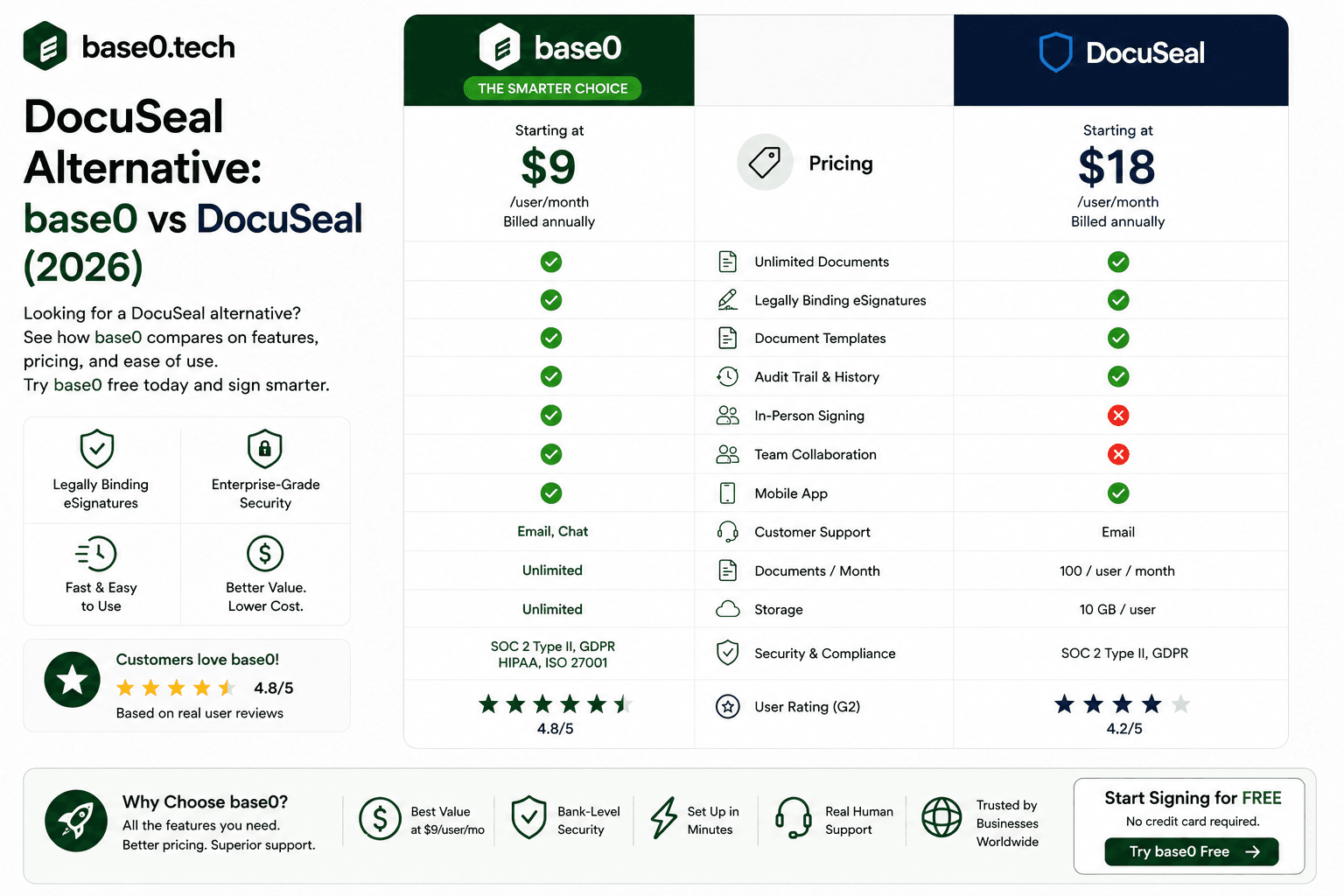
If you're searching for a DocuSeal alternative, you're not alone. DocuSeal is a capable open-source signing tool, but it comes with real constraints — self-hosting complexity, a limited free cloud tier, and a feature set that doesn't scale cleanly for growing teams. Whether you want a simpler setup, a more generous free plan, or predictable pricing that doesn't punish you for sending more documents, there are better-fitting options in 2026. This guide focuses on Base0 as a strong DocuSeal alternative for freelancers and small businesses — and walks through where it wins on pricing, features, and ease of use.
Why Look for a DocuSeal Alternative?
DocuSeal's Key Limitations in 2026
DocuSeal is an open-source e-signature platform that appeals to developers and technically inclined teams who want to self-host their signing infrastructure. That's a legitimate use case, but it comes with a cost that isn't measured in dollars. Self-hosting means you own the maintenance burden — server provisioning, updates, backups, uptime monitoring, security patching. For most freelancers and small businesses, that overhead isn't worth it.
Beyond the self-hosting complexity, DocuSeal's cloud offering has meaningful gaps. The free cloud tier is limited in ways that matter for real workflows — template flexibility, team management, and API access all tend to require paid upgrades. Support options are thin compared to commercial alternatives, and the product roadmap is community-driven, which means feature gaps can persist for a while.
Who Actually Needs a DocuSeal Alternative?
You're a good candidate if any of these apply:
- You don't want to manage your own server infrastructure just to send contracts
- You need document sending that doesn't hit a restrictive monthly cap the moment your business gets busy
- You want reusable templates and a signing workflow that works from day one, without a DevOps setup session
- You're a freelancer, small agency, or small business that needs a tool working immediately — not after configuring a self-hosted environment
- You'd rather have predictable, flat-rate pricing than manage per-envelope or per-user math
What to Look for in an E-Signature Solution
Not every DocuSeal alternative is built the same. Before you switch, evaluate candidates against:
- Pricing model — Does the free tier give you a usable monthly allowance, or does it cap you so low that real workflows stall immediately?
- Core features on the free tier — Templates and a working signing flow are reasonable to expect for free; more advanced automation is fair to reserve for a paid tier.
- Ease of setup — Can a non-technical person be up and running in under ten minutes?
- Support — Is there a real support channel, or are you relying on a GitHub issues thread?
- Where the product is headed — Is it built around one core workflow (signing), or is it trying to be five products at once?
Base0 as a DocuSeal Alternative: Quick Overview
Base0 is a cloud-hosted e-signature and contract platform built for freelancers and small businesses who need to generate contracts, get them signed, and track payment — without paying per envelope or managing their own infrastructure. It offers:
- Basic — $0/month: 50 documents per month, 3 system templates, standard email support, no credit card required
- Pro — $9/month: Everything in Basic, plus unlimited document generation, real-time Slack & Discord webhooks, flexible workflow envelope re-routing, and priority handling support
- Enterprise — $29.99/month: Everything in Pro, plus full-suite white labeling, deep Salesforce CRM automation sync, dedicated 24/7 account management, and a personalized developer API sandbox key
Because Base0 is cloud-hosted, there's no server to provision, patch, or back up — that overhead sits with Base0, not you.
Base0 is purpose-built for contract generation, signing, and payment tracking. It doesn't try to be a general-purpose document editor or a full CRM. You generate or upload a document, place fields, set recipients, and send. That focus translates into a cleaner interface and a faster time-to-value than tools that bundle signing into a much larger, more complex platform — or that require you to stand up your own hosting environment first.
Who Base0 Is Built For
- Freelancers and agencies getting client agreements and retainer contracts signed
- Small businesses sending vendor agreements, service contracts, and client onboarding paperwork
- Small teams that coordinate in Slack or Discord and want signing notifications pushed there directly
- Growing businesses that eventually want Salesforce-connected workflows and a white-labeled signing experience, without moving to an enterprise platform priced for a much bigger company
Document Signing Workflow
Base0's signing workflow follows a straightforward path: generate or upload a document, place signature and date fields, set recipients and signing order, and send. Recipients get an email with a secure signing link — no account creation required on their end.
DocuSeal offers a similar field-placement workflow, but the cloud version's feature depth depends on which plan you're on, and the self-hosted version gives you more control at the cost of managing the environment yourself. For a freelancer or small business that wants a signing workflow that just works without any server configuration, Base0's cloud-hosted approach is the more direct path.
Template Management
Base0's Basic plan includes 3 system templates, which covers the standard documents most freelancers and small businesses send repeatedly — a retainer agreement, an NDA, a standard service contract. Pro removes the document-volume ceiling entirely, so recurring sends don't require repeated manual setup.
DocuSeal supports templates too, but template depth in its cloud tier is comparatively limited. Teams that lean heavily on reusable documents will generally find a purpose-built, cloud-first tool like Base0 more practical day to day.
Integrations and Developer Access
Base0's Enterprise plan includes a personalized developer API sandbox key, along with deep Salesforce CRM automation sync — useful for a growing business that wants signing status flowing directly into its existing sales pipeline rather than living in a separate tool. Pro adds real-time Slack and Discord webhooks, so a small team already coordinating in chat gets signing notifications without checking a separate dashboard.
DocuSeal's API is one of its real strengths as an open-source tool — developers comfortable with self-hosting get to integrate freely. But for teams that don't want to run their own infrastructure just to get API access, Base0's hosted approach removes that overhead entirely.
Mobile Experience
Base0 is web-based and accessible from any modern browser on any device. Recipients open their secure signing link and complete signing on a smartphone or tablet without installing anything. DocuSeal's recipient-side signing experience is similarly browser-based on both platforms — the meaningful difference shows up on the administration side, where DocuSeal's self-hosted option adds infrastructure work Base0 simply doesn't require.
Pricing Comparison
DocuSeal
DocuSeal offers a free cloud tier with meaningful limitations on document volume and features, and paid cloud plans that unlock higher limits. The self-hosted version is open-source and technically free to deploy, but it requires your own server infrastructure and ongoing technical maintenance. For a freelancer or small business without dedicated technical resources, that "free" self-hosted option carries a real hidden cost in setup and maintenance time.
Base0
- Basic — $0/month: 50 documents/month, 3 templates, no credit card required
- Pro — $9/month: Unlimited document generation, Slack & Discord webhooks, workflow re-routing, priority support
- Enterprise — $29.99/month: White labeling, Salesforce sync, dedicated account management, developer API sandbox key
Which Offers Better Value?
For a freelancer or small business that wants a usable free tier without a self-hosting project attached to it, Base0 Basic is the more practical starting point — 50 documents a month is enough to run a real, ongoing workflow rather than a brief trial. When document volume grows past that, Pro removes the cap entirely for $9/month, and Enterprise adds the CRM and branding layer a growing business eventually needs.
Ease of Use: Where Base0 Outperforms DocuSeal
Onboarding and Setup Time
Base0 requires no credit card and no infrastructure setup. You create an account, upload or generate a document, and send it for signature within minutes. There's no server to provision and no technical prerequisites. For a freelancer or small business owner who needs to start sending contracts today — not after a setup project — this matters a lot.
DocuSeal's cloud version is reasonably quick to set up for basic use, but teams that want the full feature set — including API access and deeper template management — face a steeper path, particularly on the self-hosted version, where initial setup can take hours or days depending on your infrastructure.
Document Builder Experience
Base0's document workflow is linear and predictable: generate or upload, place fields, assign recipients, set signing order, send. There's no hidden menu or multi-step configuration required just to get a document ready. That matters most for non-technical users — someone running client contracts for a small agency shouldn't need to read documentation to send one.
Signer Experience on Any Device
When a recipient gets a Base0 signing request, they click a secure link and complete signing in their browser — no account creation, no app download. A poor signer experience is one of the most common reasons contracts get delayed, and a clean, low-friction signing flow directly affects how fast your agreements actually close.
Security Considerations
Electronic signatures collected through Base0 are intended to align with the requirements of major e-signature legal frameworks, including the U.S. ESIGN Act and UETA, which establish that electronic signatures carry the same legal weight as handwritten ones for most commercial transactions. A documented signing record — who signed, when, and in what sequence — supports the evidentiary requirements these frameworks rely on.
A note of caution here that applies to any platform, not just Base0 or DocuSeal: neither claims to be legally binding in every jurisdiction or to hold specific certified compliance status out of the box. If your use case involves specific regulatory requirements, confirm the details directly and consult qualified legal counsel.
For organizations with strict infrastructure or data residency needs, DocuSeal's self-hosted option gives you direct control over where documents live — that's a genuine advantage of the open-source route if your organization already has the technical resources to run it. Base0, being a hosted SaaS product, trades that infrastructure control for zero maintenance overhead.
Other DocuSeal Alternatives Worth Considering
DocuSign
DocuSign is the market leader in e-signatures, but its pricing is built around per-user and per-envelope fees that add up quickly. The Personal plan runs about $11/month for just five envelopes, and the Standard plan runs about $30 per user per month for up to 100 envelopes per user per year.<cite index="23-1">Docusign's Personal plan is priced at about $11 per month with five envelopes included, and the Standard plan runs about $30 per user per month with up to 100 envelopes per user per year.</cite> For a solo freelancer, that five-envelope cap is exhausted almost immediately most months.
Base0's Basic plan covers 50 documents a month at $0 — ten times DocuSign Personal's envelope allowance — and Pro removes the cap entirely for $9/month.
Dropbox Sign
Dropbox Sign's free tier allows only three signature requests a month, with the Essentials plan running around $15/month for a single user and Standard around $25 per user per month for small teams.<cite index="34-1">Dropbox Sign's free plan is capped at three signature requests per month, Essentials starts around $15 per month for one user, and Standard runs around $25 per user per month.</cite> Base0's free Basic plan alone already covers more monthly volume than Dropbox Sign's paid entry tier.
PandaDoc
PandaDoc bundles document creation, proposals, and e-signatures into one product, with a free plan capped around five documents a month and paid tiers starting near $19/user/month.<cite index="41-1">PandaDoc's free plan is capped at roughly five documents per month, with the Starter plan starting around $19 per user per month on annual billing.</cite> It's a strong choice if you specifically need proposal-building bundled with signing. If your workflow is closer to "generate a contract, get it signed, track the payment," Base0 is more focused and considerably less expensive.
SignNow
SignNow offers reasonably competitive pricing for small and mid-sized businesses, with Business plans starting around $8 per user per month.<cite index="48-1">SignNow's Business plan runs about $8 per user per month on annual billing, with each tier including around 100 signature invites per user per year.</cite> It's a solid option for a straightforward commercial signing tool, though its usage caps still apply per user per year. Base0's Pro plan removes document caps entirely for a flat $9/month.
Why Base0 Is Worth Evaluating Over DocuSeal
Beyond pricing, Base0's cloud-hosted infrastructure means zero maintenance overhead for your team, and its focused feature set — contract generation, signing, and payment tracking in one place — means faster onboarding than platforms that require you to stitch together a signing tool, an invoicing tool, and a payment tracker separately. If your priority is getting a contract signed and paid without becoming your own infrastructure team, that combination is hard to beat.
How to Switch from DocuSeal to Base0
Exporting Your Data from DocuSeal
Before switching, download your completed documents and any signing records from DocuSeal. For the cloud version, use the export or download options in your account dashboard. For self-hosted deployments, export your document archive according to your instance's backup procedures. Keep copies of completed agreements in your own file storage regardless of which platform you move to — that's good practice on any e-signature tool.
Setting Up Your Base0 Account
Go to Base0 and create your free Basic account — no credit card required. Confirm your email, and you'll land directly in the dashboard, ready to generate or upload your first document and send it for signature.
Recreating Templates
Base0 doesn't import templates directly from DocuSeal — you'll recreate them. For each recurring document type, upload the base document, place your fields, assign recipients, and save. Most standard templates (retainer agreements, NDAs, standard contracts) take only a few minutes to configure, and once saved, they're reusable indefinitely.
Going Live
Once your core templates are set up, you're ready to send. If you're bringing on additional collaborators or want white-labeling and CRM sync, Enterprise is where those capabilities live. For most freelancers and small teams, the entire switch — account setup, first templates, first send — can realistically happen in an afternoon.
FAQ
Is Base0 a good free DocuSeal alternative? Yes — Base0's Basic plan is a genuinely usable free tier: 50 documents a month, 3 templates, no credit card required. DocuSeal's free cloud tier imposes tighter limits on document volume and features, which makes Base0's free plan a stronger starting point for freelancers and small teams with moderate sending needs. When volume grows, Pro at $9/month removes the document cap entirely.
Can I use Base0 as an open-source DocuSeal alternative? No — Base0 is a commercial, cloud-hosted SaaS product, not an open-source platform. If open-source and self-hosting are hard requirements for your organization, Base0 isn't the right fit. But if your interest in DocuSeal's open-source model was really about avoiding cost or wanting flexibility, Base0 addresses both from a different angle: a real free tier at $0, and affordable paid tiers that scale without requiring you to run your own infrastructure.
How does Base0 handle legally binding signatures compared to DocuSeal? Electronic signatures on Base0 are intended to align with the requirements of e-signature legal frameworks like the U.S. ESIGN Act and UETA, supported by a documented signing record. Base0 doesn't claim its signatures are automatically legally binding in every jurisdiction or that it holds certified compliance status — that's true of DocuSeal as well. For both platforms, enforceability ultimately depends on jurisdiction, document type, and the specific circumstances of signing. Consult qualified legal counsel for anything with specific regulatory requirements.
How long does it take to migrate from DocuSeal to Base0? For most freelancers and small teams, the full migration takes a few hours at most. Account creation takes minutes, and recreating templates typically takes just a few minutes per standard document type. The main time investment is rebuilding your template library — if you have a large number of complex templates, plan for a half-day. Download and store completed documents from DocuSeal before closing that account, since Base0 doesn't import historical documents from other platforms.
Which DocuSeal alternative is best for freelancers and small businesses specifically? Base0 is a strong fit for exactly that audience because of how the pricing is structured: a genuinely usable free tier (50 documents/month, no credit card), a $9/month Pro tier that removes the document cap entirely and adds chat-tool notifications, and an Enterprise tier for businesses that eventually want CRM sync and white-labeling. Compared to alternatives like Dropbox Sign (about $15/user/month with no meaningful free tier) or PandaDoc (about $19/user/month for its entry paid plan), Base0's pricing model gives a small operation more room to grow before the bill changes.